A member section for courses is not just a locked page with a password. It should handle student logins, access after payment, lesson overviews, videos, downloadable materials, bonuses, navigation through content, and situations where a student doesn't know where to continue.
I will design the member section according to the scope of the course. It could be a simple locked section in WordPress, a course zone with lessons and modules, or a custom Laravel system for multiple courses, different access levels, dashboards, roles, and integration with payment gateways, invoicing, or email marketing.
Student accounts, login, course access, and clear entry into paid content.
Clear course structure, videos, texts, PDFs, worksheets, bonuses, and downloadable materials.
Automatic account creation, course assignment, sending instructions, or granting access to content.
Administration of courses, members, lessons, materials, access, bonuses, and follow-up products.
For paid courses, it is important that the student does not get lost after purchasing. The member section should clearly show the purchased course, lessons, order, available materials, bonuses, access status, and next steps. The fewer questions like 'where do I find the course?', the better the system is designed.
Registration, login, password recovery, access credentials, and the student's personal area.
Lessons available only to paid students, or based on a package, membership level, or specific course.
Video lessons, PDFs, worksheets, checklists, bonuses, links, and other files for students.
Granting course access after payment, sending instructions, assigning the product, and confirming the purchase.
Ability to add more courses, packages, bonus content, follow-up lessons, or an online academy later.
Management of students, access, content, lessons, files, orders, and any manual adjustments.
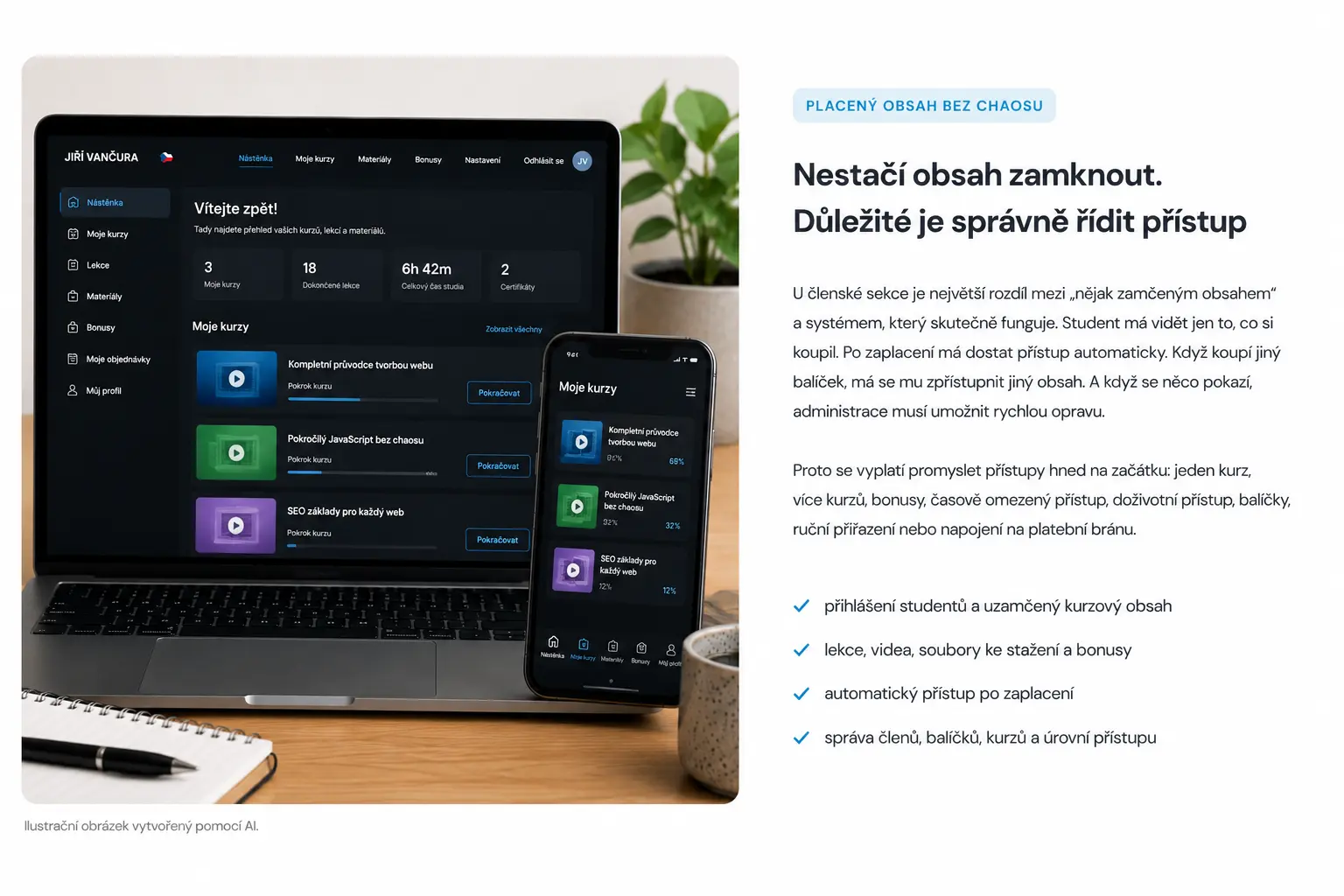
Illustrative image created by AI.
The biggest difference in a member section is between 'some locked content' and a system that actually works. The student should only see what they have purchased. They should get access automatically after payment. If they buy a different package, different content should be unlocked. And if something goes wrong, the administration must allow for quick repairs.
That is why it pays to think about access right from the beginning: one course, multiple courses, bonuses, time-limited access, lifetime access, packages, manual assignment, or integration with a payment gateway.
TIP
It is good to design the member section according to the content, not according to the plugin. First, you need to know how many courses it will have, what types of access you need, if there will be bonuses, if the content should be available at once or gradually, and how the system should react after payment.
Overview of websites and systems for courses, e-books, PDFs, and paid content.
Sales page, lessons, videos, students, and course structure.
Payment, order confirmation, automatic access, and invoicing.
Lead magnet, contact collection, sales sequence, and communication with students.
First, it is necessary to break down the content, course types, access, payment methods, and administration. Based on this, the structure of the member section, login, lessons, materials, automatic access, and possible connection to other systems will be designed.
We will clarify courses, lessons, bonuses, packages, member types, access levels, and access rules.
I will design the course overview, lesson details, navigation, login, materials, instructions, and student orientation.
After payment, the system can assign a course, create an account, send instructions, or grant access to specific content.
The section can be expanded with additional courses, email marketing, invoicing, dashboards, roles, or custom Laravel administration.
For a smaller course, a few lessons, and basic paid access, WordPress may be suitable. It allows you to quickly manage content, add lessons, and have a standard member section without unnecessarily expensive development.
Laravel makes sense if you need your own access rules, multiple roles, specific dashboards, custom administration, API integration, non-standard payments, more complex workflows, or a system that should not rely on a combination of many plugins.
One course, basic login, locked lessons, downloadable materials, and access after payment.
Multiple courses, various packages, bonuses, students, accounts, orders, email marketing, and long-term content management.
Laravel solution for custom workflows, roles, dashboards, API integration, specific access, and advanced administration.
A member section for an online course is a locked part of the website where a student gets after logging in. It can contain lessons, videos, downloadable materials, bonuses, and other paid content.
Yes. After a successful payment, the system can automatically create an account, assign course access, send access credentials, or grant access to a specific member section.
Yes. A member section can contain one course, multiple courses, different packages, bonus content, time-limited access, or different membership levels.
For a simpler member section, WordPress is often sufficient. Laravel makes sense for a custom course system, more complex roles, multiple access types, dashboards, or specific workflows.
Yes. A member section can contain video lessons, PDFs, worksheets, checklists, links, bonus materials, and other files for students.
Yes. The member section can be designed so that it can later be expanded with more courses, packages, bonuses, email marketing, invoicing, dashboards, or custom administration.
Write to me about how many courses you want to sell, how access should work, if you need online payment, videos, PDF materials, automatic emails, invoicing, or custom administration. I will design a member section without unnecessary chaos.
Tell me what kind of website or application you need to create.
Submitting any form does not commit you to anything. It is used only for a non-binding inquiry.
Before starting a website project, it is useful to have clarity about materials, WordPress, cookies and tracking.
Examples of real reviews that clients left on my Google profile.
Go to Reviews★ ★ ★ ★ ★„Člověk, který své práci a rozumí a ví co dělá. Velmi rychlá komunikace a profesionální přístup. Doporučuji.“
★ ★ ★ ★ ★„Skvělá spolupráce, při dalších projektech určitě nebudu shánět někoho jiného.“
★ ★ ★ ★ ★„S panem Vančurou jsem spolupracovala na tvorbě mých webových stránek a jsem maximálně spokojená. Oceňuji profesionální přístup, rychlou komunikaci a schopnost přesně pochopit moje představy. Web je moderní, přehledný, funkční a skvěle vypadá i na mobilu. Celý proces proběhl hladce, s jasným vysvětlením jednotlivých kroků a výborným výsledkem. Určitě doporučuji každému, kdo hledá spolehlivý a kvalitní přístup.“
★ ★ ★ ★ ★„Spolupráce při tvorbě konfigurátoru proběhla naprosto bez problémů. Oceňuji profesionální přístup, rychlou komunikaci a schopnost pochopit specifický projekt od A do Z. Konfigurátor je přehledný, funkční a přesně odpovídá mým požadavkům. Rozhodně doporučuji.“
★ ★ ★ ★ ★„Velmi dobrá a rychlá spolupráce. Doporučuji!“
★ ★ ★ ★ ★„Přesně takto si představujeme profesionální práci. Dekujeme“
★ ★ ★ ★ ★„Ať už se jedná o optimalizaci webu, nebo tvorbu na míru oceňuji kromě profesionální práce a znalostí problematiky také férový přístup a komunikaci.“
★ ★ ★ ★ ★„Děkuji za profesionální spolupráci, vše dle domluvy, naprostá spokojenost a mohu jen vřele doporučit.... Při dalších projektech určitě opět využiji Vašich služeb“
★ ★ ★ ★ ★„Profesionalita a velká ochota, nemohu jinak než doporučit“
★ ★ ★ ★ ★„Skvělá zkušenost při tvorbě webu, profesionální přístup, rychlost, ochota pomoci“
★ ★ ★ ★ ★„Rychlá spolupráce a komunikace – mohu jen doporučit.“
★ ★ ★ ★ ★„Moc mi pomohl, když jsem potřebovala pomoc s webem. A bylo to gratis :)). Jsem mu neskonale vděčná.“
★ ★ ★ ★ ★„Děkuji Jiřímu za rychlou a kvalitní spolupráci na tvorbě webu. Srozumitelná a ochotná komunikace mě vždycky potěší a přináší důvěru.“
★ ★ ★ ★ ★„Jsem maximálně spokojená. Rychlost, ochota a cenově dostupné. Děkuji“
★ ★ ★ ★ ★„Naprostá spokojenost. Rychlá komunikace, skvělá cena a odborná pomoc. Moc děkuji :)“
★ ★ ★ ★ ★„Velká spokojenost, rychlost a p. Vančura moc dobře ví co dělá. :)“
★ ★ ★ ★ ★„dobrá práce, rychlá odezva“
★ ★ ★ ★ ★„S programátory mám zkušeností hodně, ale tady musím opravdu pochválit. Pro mě a mé přátele vytvořil skvělý nástroj na evidenci sbírek a opravdu se to povedlo. Bylo to hotové rychle, kvalitně a za skvělou cenu. Komunikace funguje velmi rychle, což je super a ne úplně standard. Díky za super práci, za mě 100% spokojenost!“
★ ★ ★ ★ ★„Vše bylo rychlé a hlavně to funguje. Dobrá práce.“
★ ★ ★ ★ ★„Normálně recenze nepíši, ale zde rád doporučím kvalitní práci. Jiří pro mě vytvořil web pro dětské tábory. Kvalitní práce, rychlá komunikace a vlastní nápady, které Jiří sám přidá, jsou na velice vysoké úrovni. Nemohu hodnotit jinak než 5/5.“
★ ★ ★ ★ ★„Pan Jiri nam delal jiz 3 webove stranky a vzdy velka spokojenost, je mega rychly a vse hned kladne vyridi, mohu pouze doporucit. Poradi si bez problemu i s rezervacnimi kalendaremi, udrzbou socialnich siti, atd.“