I will create a registration form for a summer camp so that parents can clearly fill in the child's details, contacts, dates, medical information, consents, and other requirements all in one place.
The form can either just send an email or save registrations to the administration panel, where you can manage participants, camp terms, capacities, payments, and internal notes.
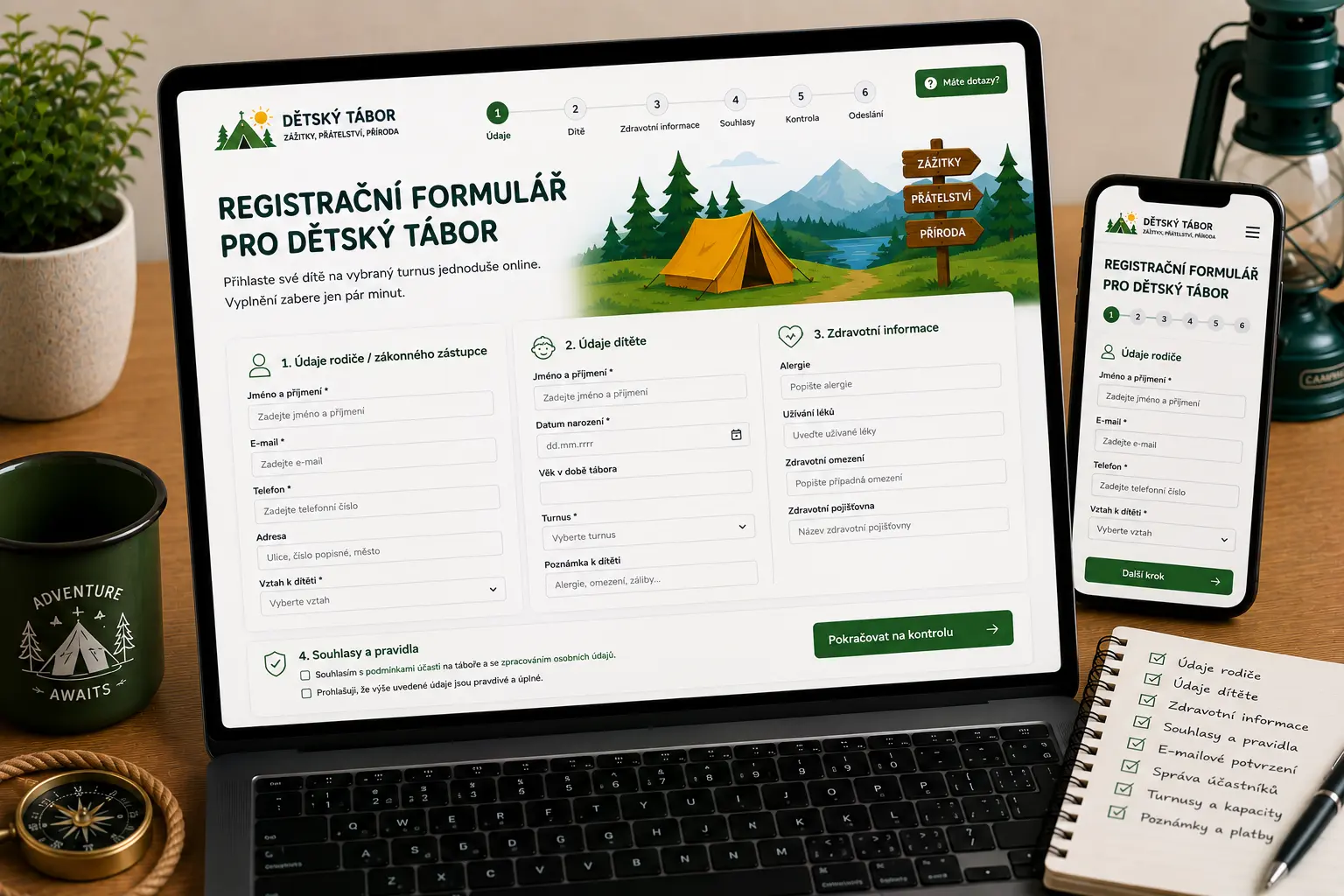
Illustrative image created by AI.
A standard contact form quickly falls apart for child registration. It lacks structure for the parent, child, term, medical data, consents, notes, payment status, and internal application processing.
The parent fills in all necessary data in the exact order, so the organizer does not have to chase missing information in subsequent emails.
The form can include rule confirmations, consent to personal data processing, medical confirmations, or other legal texts.
Registration doesn't have to end up only in an email. It can be saved to the administration, where it can be further processed by term, payment, or status.
A well-designed summer camp registration form does not feel like a long, confusing table. The details are split logically: parent, child, term, medical information, consents, and final confirmation.
Each field should have a clear purpose. Validation will reduce email typos, incorrectly selected terms, missing phone numbers, or unfilled mandatory consents.
Name of the legal guardian, email, phone number, or a secondary contact for emergencies.
Child's name, date of birth, age, or class, experience, group, or placement note.
Selection of the term, camp type, attendance options, transport, meals, or other optional services.
Confirmation of terms and conditions, camp rules, GDPR, or consent for photographs or medical information.
Child's name, date of birth, age, parent's name, email, phone number, and other contact details.
Selection of a specific date, day camp, residential camp, sports camp, or other options.
Allergies, medications, restrictions, insurance company, health warnings, dietary requirements, or a note for the leaders.
GDPR, camp rules, terms and conditions, cancellation policy, photographs, or consent to data processing.
A note from the parent, special requests, friend in the same group, transport information, or other additional details.
Submission summary, confirmation email to the parent, copy to the organizer, and further instructions regarding payment or participation.
Sensitive data is processed in a summer camp registration form. Therefore, it is important to properly handle validation, mandatory consents, spam protection, data access, and a clear explanation of what the data is used for.
The form will check the email, phone number, date of birth, selected term, mandatory consents, and other critical fields before submitting.
You can use a honeypot, nonce, rate limit, Turnstile, or another solution depending on the website technology and form type.
The form can include links to terms, privacy policies, camp rules, and other mandatory confirmations.
In the administration panel, you can manage who sees the registrations, who can edit them, and how the data is used during the camp organization.
For a smaller camp, a form that sends an email to the organizer and a confirmation to the parent upon submission might be enough. It is a simpler solution without complex administration.
For a larger camp, it makes sense to save registrations in the administration panel. The organizer can then see participants, dates, capacities, payments, notes, and processing status.
The registration form page doesn't have to be just a technical endpoint. It can target queries like summer camp registration form, child camp registration form, online camp registration, day camp application, or camp participant records.
Before the form, there should be an explanation of what the parent is filling out, what data they need to prepare, and what happens after submitting the registration.
The form should be internally linked with the camp website, term overview, information for parents, pricelist, and FAQs.
The content clearly names the parent, child, registration, term, consent, medical data, capacity, payment, and camp administration.
Important factors are correct headings, speed, responsiveness, clear error messages, structured data, meta descriptions, and internal links.
The application process with term selection, email confirmation, and option to link to capacities.
View Solution →Complete administration of terms, participants, payments, capacities, notes, and confirmations.
View Solution →Records of children, parents, dates, medical notes, payments, and organizational data.
View Solution →It can include parent's data, child's data, term selection, medical information, health insurance company, special requests, consents, a note, and registration confirmation.
Yes. Registrations can be saved in the administration panel, where you can manage participants by terms, payments, capacities, application status, and other details.
Yes. The form can include allergies, medications, medical restrictions, insurance company, dietary requirements, or other notes important for camp organization.
Yes. After submission, an automatic email can be sent to the parent with a summary of the registration, selected term, further instructions, and payment details if applicable.
For a simple email submission, WordPress might be enough. For storing registrations, terms, capacities, payments, and a custom administration panel, Laravel is more suitable.
Yes. The same principle can be used for day camps, residential camps, sports camps, language camps, after-school clubs, and training camps.
Send me what data you need to collect from parents, whether the form should only send an email, or if registrations should be saved in the administration panel with participants, terms, and payments.
Tell me what kind of website or application you need to create.
Submitting any form does not commit you to anything. It is used only for a non-binding inquiry.
Before starting a website project, it is useful to have clarity about materials, WordPress, cookies and tracking.
Examples of real reviews that clients left on my Google profile.
Go to Reviews★ ★ ★ ★ ★„Člověk, který své práci a rozumí a ví co dělá. Velmi rychlá komunikace a profesionální přístup. Doporučuji.“
★ ★ ★ ★ ★„Skvělá spolupráce, při dalších projektech určitě nebudu shánět někoho jiného.“
★ ★ ★ ★ ★„S panem Vančurou jsem spolupracovala na tvorbě mých webových stránek a jsem maximálně spokojená. Oceňuji profesionální přístup, rychlou komunikaci a schopnost přesně pochopit moje představy. Web je moderní, přehledný, funkční a skvěle vypadá i na mobilu. Celý proces proběhl hladce, s jasným vysvětlením jednotlivých kroků a výborným výsledkem. Určitě doporučuji každému, kdo hledá spolehlivý a kvalitní přístup.“
★ ★ ★ ★ ★„Spolupráce při tvorbě konfigurátoru proběhla naprosto bez problémů. Oceňuji profesionální přístup, rychlou komunikaci a schopnost pochopit specifický projekt od A do Z. Konfigurátor je přehledný, funkční a přesně odpovídá mým požadavkům. Rozhodně doporučuji.“
★ ★ ★ ★ ★„Velmi dobrá a rychlá spolupráce. Doporučuji!“
★ ★ ★ ★ ★„Přesně takto si představujeme profesionální práci. Dekujeme“
★ ★ ★ ★ ★„Ať už se jedná o optimalizaci webu, nebo tvorbu na míru oceňuji kromě profesionální práce a znalostí problematiky také férový přístup a komunikaci.“
★ ★ ★ ★ ★„Děkuji za profesionální spolupráci, vše dle domluvy, naprostá spokojenost a mohu jen vřele doporučit.... Při dalších projektech určitě opět využiji Vašich služeb“
★ ★ ★ ★ ★„Profesionalita a velká ochota, nemohu jinak než doporučit“
★ ★ ★ ★ ★„Skvělá zkušenost při tvorbě webu, profesionální přístup, rychlost, ochota pomoci“
★ ★ ★ ★ ★„Rychlá spolupráce a komunikace – mohu jen doporučit.“
★ ★ ★ ★ ★„Moc mi pomohl, když jsem potřebovala pomoc s webem. A bylo to gratis :)). Jsem mu neskonale vděčná.“
★ ★ ★ ★ ★„Děkuji Jiřímu za rychlou a kvalitní spolupráci na tvorbě webu. Srozumitelná a ochotná komunikace mě vždycky potěší a přináší důvěru.“
★ ★ ★ ★ ★„Jsem maximálně spokojená. Rychlost, ochota a cenově dostupné. Děkuji“
★ ★ ★ ★ ★„Naprostá spokojenost. Rychlá komunikace, skvělá cena a odborná pomoc. Moc děkuji :)“
★ ★ ★ ★ ★„Velká spokojenost, rychlost a p. Vančura moc dobře ví co dělá. :)“
★ ★ ★ ★ ★„dobrá práce, rychlá odezva“
★ ★ ★ ★ ★„S programátory mám zkušeností hodně, ale tady musím opravdu pochválit. Pro mě a mé přátele vytvořil skvělý nástroj na evidenci sbírek a opravdu se to povedlo. Bylo to hotové rychle, kvalitně a za skvělou cenu. Komunikace funguje velmi rychle, což je super a ne úplně standard. Díky za super práci, za mě 100% spokojenost!“
★ ★ ★ ★ ★„Vše bylo rychlé a hlavně to funguje. Dobrá práce.“
★ ★ ★ ★ ★„Normálně recenze nepíši, ale zde rád doporučím kvalitní práci. Jiří pro mě vytvořil web pro dětské tábory. Kvalitní práce, rychlá komunikace a vlastní nápady, které Jiří sám přidá, jsou na velice vysoké úrovni. Nemohu hodnotit jinak než 5/5.“
★ ★ ★ ★ ★„Pan Jiri nam delal jiz 3 webove stranky a vzdy velka spokojenost, je mega rychly a vse hned kladne vyridi, mohu pouze doporucit. Poradi si bez problemu i s rezervacnimi kalendaremi, udrzbou socialnich siti, atd.“