A patient form can be used for new patients, booking, collecting initial intake information, contact details, type of difficulties, attachments, or communication prior to the visit.
The goal is not to create a complex form full of inputs, but a clear solution that the patient can easily fill out, providing the clinic with all essential information.
Name, phone, email, date of birth, or other details based on the type of practice.
The patient can add their issue, reason for visit, or other information before booking.
Option to upload documents, photos, medical results, or other files.
Confirmation to the patient, sending to email, or other subsequent steps.
In some places, a simple contact form is enough. Elsewhere, it's necessary to handle new patients, types of complaints, attachments, multiple steps, consents, service selection, or internal workflows.
Basic data, contacts, reason for visit, or intake information.
Pain, limitations, examination, consultation, or another reason for the visit.
Photos, documents, examination results, or other supporting files.
Examination, physiotherapy, dental hygiene, consultation, or other type of service.
Option to divide the form into multiple steps for better clarity.
Confirmation to the patient, internal alerts, or other sequential workflows.
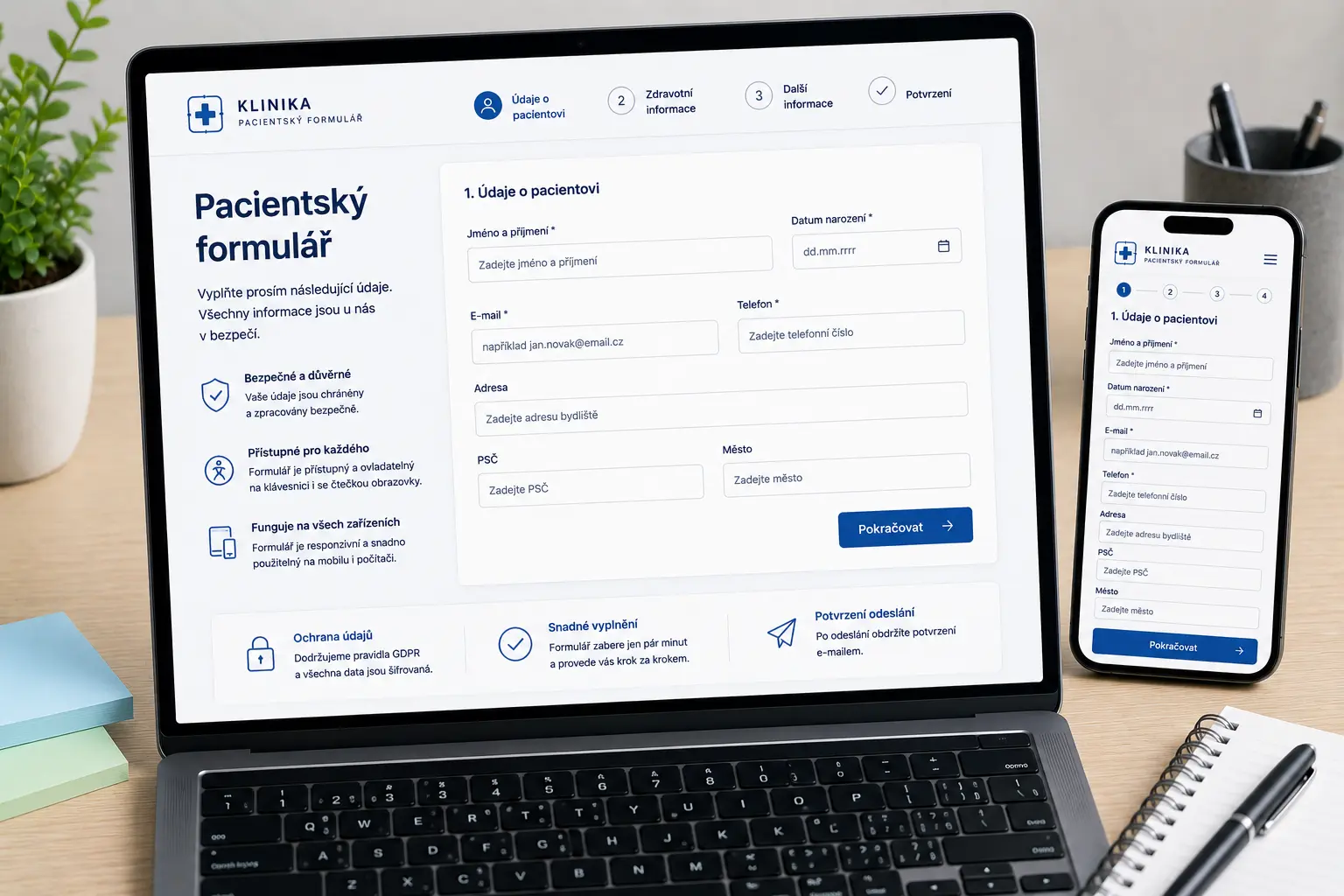
Illustrative image created by AI.
A patient form should be well-arranged, readable, and usable on both phones and computers. Correct field structure, clear labels, validation, and comprehensive error messages are essential.
For healthcare forms, accessibility is highly relevant. Forms should work via keyboard, have correctly linked labels, and error messages announced to screen readers.
TIP
If the form displays an error message in real time, it should also be announced to screen readers. Often aria-live or role="alert" is used, otherwise a person using a reader might not find out at all that the form is reporting an error.
First, it is necessary to determine what data the clinic needs to collect, how the ordering works, and what workflow follows after the form is submitted.
We will find out what information the patient fills out and what the clinic needs.
I will design the field structure, form steps, validation, and workflow.
I will prepare a responsive form, submission handling, notifications, and the technical solution.
It is possible to add attachments, administration, multiple steps, or other workflows.
A patient form is a web form through which a patient submits contact details, request type, preferred date, notes, or other information needed before the visit.
The form can be created for physiotherapy, dental clinics, eye clinics, rehabilitation, private practices, or other healthcare services.
Yes. The form can allow uploading attachments, documents, photos, or other files based on the needs of the specific practice.
Yes. The submitted data can be sent to an email, confirmed to the patient, saved in administration, or connected to other web workflows.
Yes. Forms on a clinic or medical practice website should be clear, readable, properly labeled, usable on mobile and keyboard, and accompanied by clear error messages.
Yes. The form can be divided into multiple steps to make it clearer so that the patient is not overwhelmed by too many fields at once.
Write to me about what information you need to collect from patients and how your booking or workflow functions. I will prepare a form focused on clarity, usability, and simpler communication.
Tell me what kind of website or application you need to create.
Before starting a website project, it is useful to have clarity about materials, WordPress, cookies and tracking.
Examples of real reviews that clients left on my Google profile.
Go to Reviews★ ★ ★ ★ ★„Člověk, který své práci a rozumí a ví co dělá. Velmi rychlá komunikace a profesionální přístup. Doporučuji.“
★ ★ ★ ★ ★„Skvělá spolupráce, při dalších projektech určitě nebudu shánět někoho jiného.“
★ ★ ★ ★ ★„S panem Vančurou jsem spolupracovala na tvorbě mých webových stránek a jsem maximálně spokojená. Oceňuji profesionální přístup, rychlou komunikaci a schopnost přesně pochopit moje představy. Web je moderní, přehledný, funkční a skvěle vypadá i na mobilu. Celý proces proběhl hladce, s jasným vysvětlením jednotlivých kroků a výborným výsledkem. Určitě doporučuji každému, kdo hledá spolehlivý a kvalitní přístup.“
★ ★ ★ ★ ★„Spolupráce při tvorbě konfigurátoru proběhla naprosto bez problémů. Oceňuji profesionální přístup, rychlou komunikaci a schopnost pochopit specifický projekt od A do Z. Konfigurátor je přehledný, funkční a přesně odpovídá mým požadavkům. Rozhodně doporučuji.“
★ ★ ★ ★ ★„Velmi dobrá a rychlá spolupráce. Doporučuji!“
★ ★ ★ ★ ★„Přesně takto si představujeme profesionální práci. Dekujeme“
★ ★ ★ ★ ★„Ať už se jedná o optimalizaci webu, nebo tvorbu na míru oceňuji kromě profesionální práce a znalostí problematiky také férový přístup a komunikaci.“
★ ★ ★ ★ ★„Děkuji za profesionální spolupráci, vše dle domluvy, naprostá spokojenost a mohu jen vřele doporučit.... Při dalších projektech určitě opět využiji Vašich služeb“
★ ★ ★ ★ ★„Profesionalita a velká ochota, nemohu jinak než doporučit“
★ ★ ★ ★ ★„Skvělá zkušenost při tvorbě webu, profesionální přístup, rychlost, ochota pomoci“
★ ★ ★ ★ ★„Rychlá spolupráce a komunikace – mohu jen doporučit.“
★ ★ ★ ★ ★„Moc mi pomohl, když jsem potřebovala pomoc s webem. A bylo to gratis :)). Jsem mu neskonale vděčná.“
★ ★ ★ ★ ★„Děkuji Jiřímu za rychlou a kvalitní spolupráci na tvorbě webu. Srozumitelná a ochotná komunikace mě vždycky potěší a přináší důvěru.“
★ ★ ★ ★ ★„Jsem maximálně spokojená. Rychlost, ochota a cenově dostupné. Děkuji“
★ ★ ★ ★ ★„Naprostá spokojenost. Rychlá komunikace, skvělá cena a odborná pomoc. Moc děkuji :)“
★ ★ ★ ★ ★„Velká spokojenost, rychlost a p. Vančura moc dobře ví co dělá. :)“
★ ★ ★ ★ ★„dobrá práce, rychlá odezva“
★ ★ ★ ★ ★„S programátory mám zkušeností hodně, ale tady musím opravdu pochválit. Pro mě a mé přátele vytvořil skvělý nástroj na evidenci sbírek a opravdu se to povedlo. Bylo to hotové rychle, kvalitně a za skvělou cenu. Komunikace funguje velmi rychle, což je super a ne úplně standard. Díky za super práci, za mě 100% spokojenost!“
★ ★ ★ ★ ★„Vše bylo rychlé a hlavně to funguje. Dobrá práce.“
★ ★ ★ ★ ★„Normálně recenze nepíši, ale zde rád doporučím kvalitní práci. Jiří pro mě vytvořil web pro dětské tábory. Kvalitní práce, rychlá komunikace a vlastní nápady, které Jiří sám přidá, jsou na velice vysoké úrovni. Nemohu hodnotit jinak než 5/5.“
★ ★ ★ ★ ★„Pan Jiri nam delal jiz 3 webove stranky a vzdy velka spokojenost, je mega rychly a vse hned kladne vyridi, mohu pouze doporucit. Poradi si bez problemu i s rezervacnimi kalendaremi, udrzbou socialnich siti, atd.“