Website integration with SmartEmailing makes it possible to automatically transfer contacts from a form, newsletter registration, order, inquiry or administration directly into the e-mailing tool. In most cases, manual copying of e-mails, client details, consents or other data is no longer needed.
I handle integration of WordPress forms, Bricks Builder, Contact Form 7, WooCommerce, custom forms and Laravel applications with SmartEmailing using an API, webhooks or custom server-side logic. Suitable mainly for entrepreneurs who want to automate contact collection, newsletter registrations, segmentation, lead magnets, inquiries or e-mailing campaigns.
The integration can be handled through a webhook, WordPress REST API, custom PHP endpoint, Laravel backend or individual API integration based on the specific workflow and website process.
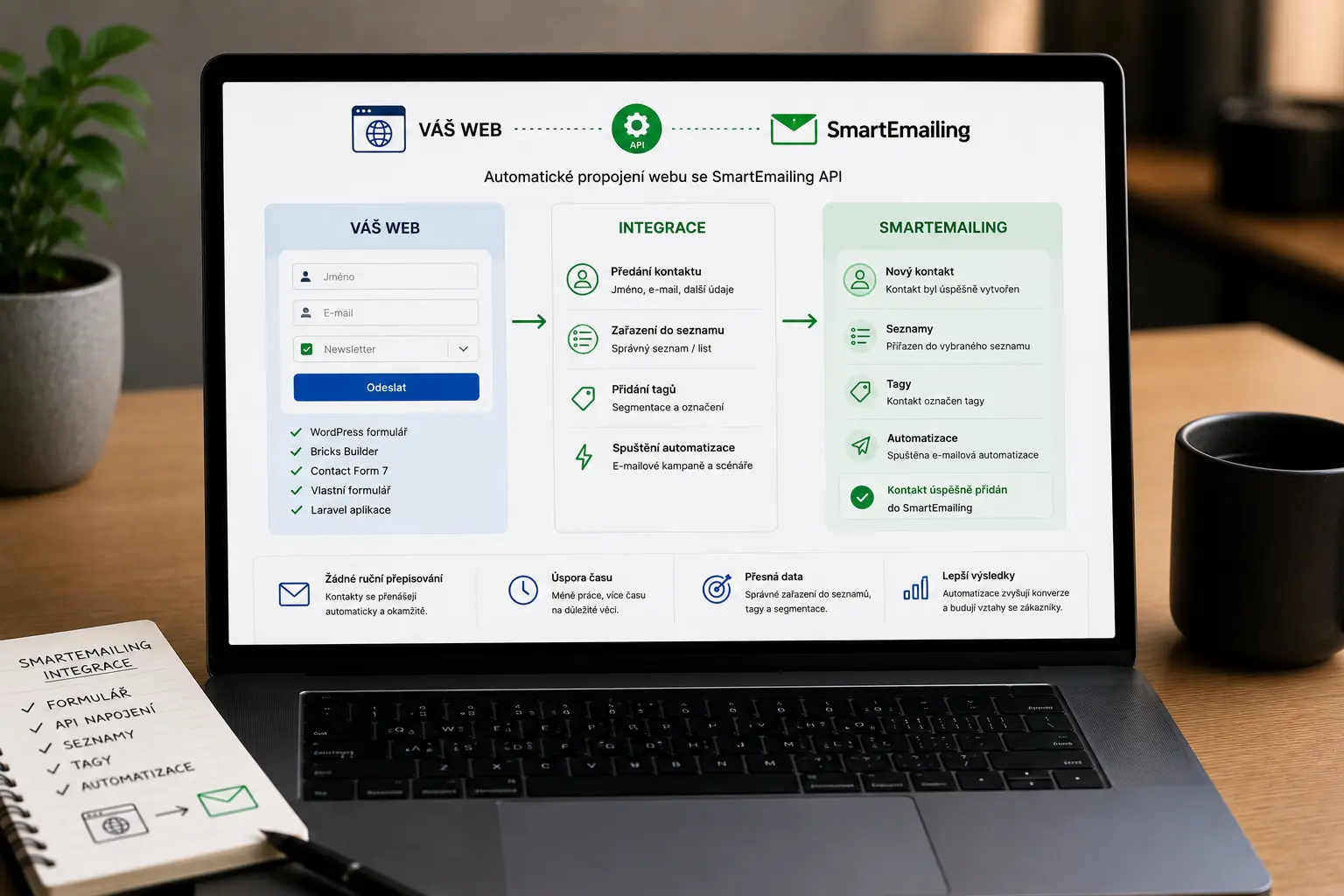
I handle website integration with SmartEmailing based on the specific website process. The integration can work through a webhook, WordPress REST API, custom PHP endpoint, Laravel controller or server-side API logic.
Specific integration options depend on the used form, plugin, API and required workflow.
Data from a form, order, reservation or administration can be automatically sent to SmartEmailing using an API request. The integration can include contact creation, contact update, assignment to a list, saving custom fields, consent transfer or tag assignment.
The solution is suitable for Bricks Builder, Contact Form 7, WooCommerce, custom WordPress forms and Laravel applications. Each integration can be adjusted according to the specific workflow, data validation and follow-up e-mailing processes.
automatic form processing
transfer of a contact to SmartEmailing
saving a contact into a specific list
transfer of custom fields
assignment of tags and segments
transfer of marketing consent
server-side data validation
e-mail notifications
API error logging
integration of other external systems
Data from contact forms, newsletter forms, orders, reservations, WooCommerce orders, lead magnets or custom administrations can be automatically transferred to SmartEmailing.
first and last name
phone
consent to data processing
marketing consent
registration source
form type
campaign name
custom fields
tags
contact segmentation data
note
customer status
ordered service
service type
order value
order number
page URL
website language
internal note
reservation details
lead magnet
registration date
custom form parameters
Website integration with SmartEmailing often cannot be solved by simply embedding a basic form. Common problems include incorrect consent processing, inability to transfer custom fields, duplicate contacts, a non-working webhook or limited workflow of a standard plugin.
the form does not transfer all required data
the contact is not saved into the correct list
custom fields are not transferred
marketing consent is not saved
duplicate contacts are created
the webhook does not work after form submission
the API request does not send correct data
incorrect form field mapping
missing e-mail or phone validation
registration source cannot be identified
it is not possible to assign a tag based on the form
the plugin does not support the required workflow
the Laravel form is not connected to e-mail marketing
Contact Form 7 does not transfer custom data
Bricks Builder forms often require a custom webhook or endpoint for more complex workflows
The client submits a form created in WordPress using Bricks Builder, Contact Form 7 or a custom solution. The website validates and processes the data, then sends an API request to SmartEmailing through a webhook, REST API or backend logic.
SmartEmailing then saves or updates the contact, assigns it to a list, saves custom fields, a tag, registration source or consent. The process can also include automatic sending of a confirmation e-mail, launching a campaign, contact segmentation or integration of other external systems.
Universal plugins are often not enough for a specific workflow, custom forms or specific automations. Every website works differently and integration with SmartEmailing usually needs to be adjusted to a specific process.
A custom integration allows Bricks Builder, Contact Form 7, WooCommerce, a Laravel application or a custom form to be connected exactly according to what should happen after submission.
The integration can include data validation, custom logic, automatic e-mails, API handling, webhooks, error logging, contact tagging, segmentation or connection to other external systems.
Integration with SmartEmailing does not have to mean only saving an e-mail to a newsletter. Depending on the specific process, it is possible to automatically create contacts, update data, save custom fields, assign tags, segment the database or trigger other follow-up automations.
After submitting the form, contact details, consent, registration source, tags or other data can be automatically transferred.
Individual integration of a Bricks form through a webhook or custom endpoint for data processing and communication with the SmartEmailing API.
Possibility to individually connect a contact, newsletter or order form with the e-mailing tool and automatic processing.
Possibility of individual integration of WooCommerce orders with SmartEmailing API based on a specific customer or marketing process.
Integration of a Laravel application, administration, form or customer portal with SmartEmailing through custom backend logic.
The website can automatically create or update a contact in SmartEmailing after form submission.
Custom data from a form, order, reservation or internal administration can be transferred to SmartEmailing.
A contact can be categorized by service type, form, campaign, source or user interest.
Data can be processed through a custom WordPress REST API endpoint, PHP logic or Laravel controller without a universal plugin.
After form submission, the website or backend can trigger a webhook that sends data to SmartEmailing.
Before sending, required fields, e-mail format, consent, phone or correct value mapping can be validated.
The integration can include error logging, API response checking and troubleshooting issues when sending contacts.
Website integration with SmartEmailing is suitable mainly for entrepreneurs, small businesses, e-shops and services that want to automate contact collection, newsletter registrations, inquiries, lead magnets or customer communication.
For example a newsletter registration, inquiry, contact form, order, reservation or configurator.
The system verifies the e-mail, required fields, consent, registration source and prepares the data for transfer to SmartEmailing.
The data is sent through a webhook, WordPress REST API, custom PHP endpoint or Laravel backend.
Depending on the settings, the contact can be created or updated, assigned to a list, saved with custom fields or tagged.
The contact can then be used for newsletters, segmentation, e-mail automation, campaigns or internal processes.
The specific technical solution depends on the website, form type and required automation. The integration can use WordPress hooks, webhooks, REST API, PHP endpoints, Laravel backend, JSON requests, API authentication or custom server-side logic.
Yes. A web form, WordPress, WooCommerce or Laravel application can be connected to SmartEmailing using an API, webhook or custom integration so that contacts are automatically transferred to the e-mailing tool.
Yes. A WordPress form can be connected to SmartEmailing based on what data should be transferred, which contact list it should be saved to and which tags or custom fields should be set.
Yes. Bricks Builder forms can be individually connected to SmartEmailing through a webhook, custom endpoint or API integration. Form data can be automatically processed and sent to SmartEmailing.
Yes. Contact Form 7 can be individually connected to SmartEmailing so that e-mail, name, phone, consent, registration source, tag or other custom fields are automatically transferred after form submission.
Yes. WooCommerce orders can be individually connected to SmartEmailing API based on the specific process. After an order, customer details, ordered service, order value, segment or tag can be transferred.
Yes. A Laravel form, administration, portal or custom application can be connected to SmartEmailing through backend API logic. The solution can be adjusted to a specific workflow.
Usually, a SmartEmailing account, API access, target contact list and clearly defined fields to be transferred from the website are needed.
Yes. For forms, consent transfer, registration source, custom fields and other data can also be handled based on the specific process.
Yes. Custom fields from a form can be transferred to SmartEmailing, such as phone, service type, registration source, note, customer status or other data needed for segmentation.
Yes. Contacts can be automatically assigned tags based on the form, service, campaign, source or inquiry type and then used for segmentation or e-mailing campaigns.
Yes. Depending on the settings, the contact can be saved to a specific contact list in SmartEmailing. With multiple forms, different lists can also be handled based on registration type.
Yes. A custom newsletter form can be connected without a universal plugin through a custom endpoint, webhook or API logic. The solution can be adjusted exactly to the data that needs to be transferred.
A ready-made plugin or embedded form can be enough for simple cases. Custom integration is more suitable when you need a specific workflow, custom fields, tags, segmentation, data validation or integration of multiple forms.
Yes. If an integration already exists but does not work correctly, it is possible to check the webhook, API requests, field mapping, API responses, logs and the entire data processing flow.
Yes. Besides SmartEmailing, the website can also be connected to CRM, Fakturoid, iÚčto, a reservation system, internal administration or other external tools based on the specific workflow.
The price depends on the complexity of the integration, the form used, the number of transferred fields, tagging, segmentation and follow-up processes. A simple newsletter form has a different scope than complex automation across multiple forms.
Describe how the whole process should work. Ideally, write where the contacts should come from, which fields should be transferred to SmartEmailing and what should happen after form submission.
Tell me what website integration you need and what should happen after submitting a form, order, or inquiry.
Examples of real reviews that clients left on my Google profile.
Go to Reviews★ ★ ★ ★ ★„Skvělá spolupráce, při dalších projektech určitě nebudu shánět někoho jiného.“
★ ★ ★ ★ ★„S panem Vančurou jsem spolupracovala na tvorbě mých webových stránek a jsem maximálně spokojená. Oceňuji profesionální přístup, rychlou komunikaci a schopnost přesně pochopit moje představy. Web je moderní, přehledný, funkční a skvěle vypadá i na mobilu. Celý proces proběhl hladce, s jasným vysvětlením jednotlivých kroků a výborným výsledkem. Určitě doporučuji každému, kdo hledá spolehlivý a kvalitní přístup.“
★ ★ ★ ★ ★„Spolupráce při tvorbě konfigurátoru proběhla naprosto bez problémů. Oceňuji profesionální přístup, rychlou komunikaci a schopnost pochopit specifický projekt od A do Z. Konfigurátor je přehledný, funkční a přesně odpovídá mým požadavkům. Rozhodně doporučuji.“
★ ★ ★ ★ ★„Velmi dobrá a rychlá spolupráce. Doporučuji!“
★ ★ ★ ★ ★„Přesně takto si představujeme profesionální práci. Dekujeme“
★ ★ ★ ★ ★„Ať už se jedná o optimalizaci webu, nebo tvorbu na míru oceňuji kromě profesionální práce a znalostí problematiky také férový přístup a komunikaci.“
★ ★ ★ ★ ★„Děkuji za profesionální spolupráci, vše dle domluvy, naprostá spokojenost a mohu jen vřele doporučit.... Při dalších projektech určitě opět využiji Vašich služeb“
★ ★ ★ ★ ★„Profesionalita a velká ochota, nemohu jinak než doporučit“
★ ★ ★ ★ ★„Skvělá zkušenost při tvorbě webu, profesionální přístup, rychlost, ochota pomoci“
★ ★ ★ ★ ★„Rychlá spolupráce a komunikace – mohu jen doporučit.“
★ ★ ★ ★ ★„Moc mi pomohl, když jsem potřebovala pomoc s webem. A bylo to gratis :)). Jsem mu neskonale vděčná.“
★ ★ ★ ★ ★„Děkuji Jiřímu za rychlou a kvalitní spolupráci na tvorbě webu. Srozumitelná a ochotná komunikace mě vždycky potěší a přináší důvěru.“
★ ★ ★ ★ ★„Jsem maximálně spokojená. Rychlost, ochota a cenově dostupné. Děkuji“
★ ★ ★ ★ ★„Naprostá spokojenost. Rychlá komunikace, skvělá cena a odborná pomoc. Moc děkuji :)“
★ ★ ★ ★ ★„Velká spokojenost, rychlost a p. Vančura moc dobře ví co dělá. :)“
★ ★ ★ ★ ★„dobrá práce, rychlá odezva“
★ ★ ★ ★ ★„S programátory mám zkušeností hodně, ale tady musím opravdu pochválit. Pro mě a mé přátele vytvořil skvělý nástroj na evidenci sbírek a opravdu se to povedlo. Bylo to hotové rychle, kvalitně a za skvělou cenu. Komunikace funguje velmi rychle, což je super a ne úplně standard. Díky za super práci, za mě 100% spokojenost!“
★ ★ ★ ★ ★„Vše bylo rychlé a hlavně to funguje. Dobrá práce.“
★ ★ ★ ★ ★„Normálně recenze nepíši, ale zde rád doporučím kvalitní práci. Jiří pro mě vytvořil web pro dětské tábory. Kvalitní práce, rychlá komunikace a vlastní nápady, které Jiří sám přidá, jsou na velice vysoké úrovni. Nemohu hodnotit jinak než 5/5.“
★ ★ ★ ★ ★„Pan Jiri nam delal jiz 3 webove stranky a vzdy velka spokojenost, je mega rychly a vse hned kladne vyridi, mohu pouze doporucit. Poradi si bez problemu i s rezervacnimi kalendaremi, udrzbou socialnich siti, atd.“